




How to enhance audio for video editing?
 Aug 06, 2025|
 Hey there, fellow video editors! If you're like me, you know that audio can make or break a video. It's not just about having clear dialogue; it's about creating an immersive experience that keeps your viewers engaged from start to finish. As an audio supplier, I've seen firsthand how the right audio equipment and techniques can take your video editing to the next level. In this blog post, I'm going to share some tips on how to enhance audio for video editing, along with some of the top-notch audio analyzers we offer.

1. Start with Good Recording
The first step in enhancing audio for video editing is to start with high-quality recordings. Here are some key points to keep in mind:
- Choose the Right Microphone: Different microphones are designed for different purposes. For video interviews or voiceovers, a condenser microphone can capture clear and detailed audio. On the other hand, a dynamic microphone is more robust and can handle high sound pressure levels, making it great for live events or outdoor recordings.
- Position the Microphone Correctly: Place the microphone close to the sound source to minimize background noise. For example, if you're recording someone speaking, position the microphone at mouth level, about 6 - 12 inches away.
- Record in a Quiet Environment: Try to record in a room with minimal background noise. If you can't avoid noise completely, use soundproofing materials like acoustic panels to reduce echoes and external sounds.
2. Use Audio Analyzers for Quality Check
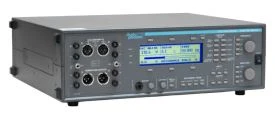
Once you've recorded your audio, it's time to check its quality. This is where audio analyzers come in handy. At our company, we offer several top-of-the-line audio analyzers, such as the ATS-1 Audio Precision Audio Analyzer, ATS-2 Audio Precision Audio Analyzer, and U8903B Agilent Performance Audio Spectrum Analyzer.
- ATS-1 Audio Precision Audio Analyzer: This analyzer is perfect for basic audio quality checks. It can measure parameters like frequency response, distortion, and signal-to-noise ratio. With its user-friendly interface, you can quickly identify any issues with your audio recordings.
- ATS-2 Audio Precision Audio Analyzer: If you need more advanced analysis, the ATS-2 is the way to go. It offers a wider range of measurement capabilities and can provide more detailed information about your audio. This is great for professional video editors who demand the highest quality audio.
- U8903B Agilent Performance Audio Spectrum Analyzer: This analyzer is ideal for analyzing the frequency spectrum of your audio. It can help you identify specific frequencies that may be causing problems, such as background hums or high-pitched whistles. By using this analyzer, you can make targeted adjustments to improve the overall audio quality.
3. Edit and Enhance the Audio
After checking the audio quality, it's time to edit and enhance it. Here are some common audio editing techniques:
- Trim and Cut: Remove any unwanted parts of the audio, such as long pauses or background noise at the beginning or end of the recording.
- Equalization (EQ): Use EQ to adjust the frequency balance of the audio. For example, if the audio sounds too bass-heavy, you can reduce the low frequencies. Conversely, if it sounds too thin, you can boost the mid or high frequencies.
- Compression: Compression helps to even out the volume of the audio. It reduces the dynamic range, making the loud parts quieter and the quiet parts louder. This ensures that the audio remains consistent throughout the video.
- Noise Reduction: If there is background noise in the audio, you can use noise reduction tools to remove it. However, be careful not to overdo it, as this can sometimes make the audio sound unnatural.
4. Synchronize Audio and Video
One of the most important aspects of video editing is synchronizing the audio and video. Here are some tips to ensure a seamless synchronization:
- Use Timecode: If your recording equipment supports it, use timecode to ensure that the audio and video are in sync. Timecode provides a precise way to match the audio and video frames.
- Visual Cues: Look for visual cues in the video, such as lip movements, to help you align the audio. You can also use audio editing software to zoom in on the audio and video waveforms for more accurate alignment.
5. Add Sound Effects and Music
Sound effects and music can add a lot of depth and emotion to your video. Here's how to use them effectively:
- Choose the Right Sound Effects: Select sound effects that are appropriate for the content of your video. For example, if you're creating a suspenseful video, use eerie sound effects like creaking doors or howling winds.
- Mix the Sound Effects and Music: Blend the sound effects and music with the main audio to create a balanced audio mix. Make sure that the sound effects and music don't overpower the dialogue or other important audio elements.
6. Test the Audio on Different Devices
Before finalizing your video, it's important to test the audio on different devices. This ensures that the audio sounds good on a variety of platforms, such as computers, smartphones, and tablets. Here are some things to keep in mind:
- Volume Levels: Check that the volume levels are consistent across different devices. You don't want the audio to be too loud or too quiet on some devices.
- Audio Quality: Listen for any audio artifacts or distortion on different devices. If you notice any issues, go back and make the necessary adjustments.
Conclusion
Enhancing audio for video editing is a multi-step process that requires attention to detail and the right tools. By following the tips outlined in this blog post and using our high-quality audio analyzers, you can create videos with exceptional audio quality. Whether you're a beginner or a professional video editor, we're here to help you take your audio to the next level.
If you're interested in purchasing any of our audio analyzers or have any questions about audio enhancement for video editing, feel free to reach out to us for a procurement discussion. We're always happy to assist you in finding the best solutions for your needs.
References
- "Audio for Video: A Filmmaker's Guide" by Tomlinson Holman
- "The Audio Bible: The Complete Guide to Sound for Film, Television, and Games" by David Sonnenschein